Nate St. Pierre ← Back to Forge main page

A working demonstration

Forge, inside a family office.

This page walks through ten chores from a typical family office — the vault drawer, the capital calls, the K-1 season, the meeting nobody wrote down — and the machines built to run them.

“Forge handles all the in-between stuff that eats your day — it's not trying to integrate with everything, not trying to own your infrastructure. It builds workflow machines for you that are one of one, perfect for you.”

— Nate St. Pierre, the guy who makes Forge

If someone forwarded you this link: it needs no context. Start at the top, follow what interests you, and check the numbers against their sources as you go.

First of all

Here's what it is.

Forge is a machine that builds machines.

Tell it the shape of your problem — out loud, in your own words — and it builds the little machine that handles it: a tracker, a planner, a transformer, one simple place for everything about the stuff you run. Anything you can think of.

Every machine it builds is yours forever: it lives in a folder on your own computer, and you can change it by voice any time — “make it work like this instead” is all you have to say to mold it into exactly what you need.

The machines on this page were built exactly that way — each one by describing a family-office chore out loud. You’ll see what was said, what got built, and how to check its work.

Before anything else

We know your world.

A family office runs on paper that never stops arriving, and on two or three people who hold the whole picture in their heads.

The finance seat

Capital calls against four entities, distribution notices that don't say which pocket they land in, and a quarter-end tie-out that lives in one person's spreadsheet.

capital call notices · custodian statements · distribution notices · wire confirmations
The ops & EA seat

The calendar of everything owed to anyone, the travel folder, the insurance renewals, and the meeting where six things were decided and nothing was written down.

dec pages · meeting recordings · travel confirmations · renewal notices
The vault

Trust instruments, operating agreements, appraisals, and a “to file” folder that has quietly become the real filing system.

trust instruments · K-1s · operating agreements · appraisals · untitled.pdf

Most offices run all of this on a spreadsheet, a folder tree, and somebody's memory. That's not a criticism — it's the job these machines were built for.

Wrenfield, the office on this page, is a fictional family office, built to show you shapes. Every document is invented and marked. The numbers are fiction; the reasoning isn't — click any figure and check where it came from. [browse every real document]

The whole thing, on one screen

Ten machines. One board.

This is a family office's Forge today: ten machines on one board. Each one was built once, from one conversation — someone described a chore, and out came a machine. They live here now, to run any time, instantly. Everything below is the story of where each card came from.

the home board · every machine this office has built, on one screen open the full board ↗

In your real board every document link is live: open any file from any page, view, or board it's named on, or straight from the folder it sits in on your own computer — every link is just a link to a file on your machine. In this demo those source links are marked but inert, since the underlying files stay in the demo world.

Not just dashboards

Forge builds the most beautiful dashboards you'll never have to open.

Every machine here has a conversation attached — and so does the whole board. Ask any machine anything, from anywhere, at any time; you don't even have to be inside it. A top-tier Claude brain wakes up against all of it at once and does the work: pulls the answer, reads the files, writes the summary, or changes how a machine runs when you ask it to.

The dashboards are just the window. The real thing is the AI standing behind every one of them, on the whole world at once, ready the moment you speak.

One of those ten. Start with what it caught.

This is the last one they built: an overview machine whose only job is to read what all the other machines produce and say what's missing. It doesn't watch anything, it isn't an overseer — it's a tool like the rest, built by asking, and it runs when you run it. The page it produced: two lists of three renewals that don't match, and one policy renewing in 56 days that no single machine could see.

office overview · “What's supposed to be here, and isn't” open full page ↗

“Nothing here is broken. It is simply a gap that only exists between two files, so only something that reads both can name it.”

That last line is the machine's own, printed on the page it produced. Everything that follows on this page circles back to it.

The problem reel

Ten chores from this office. Ten machines that now exist.

Each one below follows the same arc: a real chore, someone describing it to Forge in plain words, and the machine that came out. Three are shown start to finish with the actual build conversations, word for word; the other seven are quick. Every number links to where it came from, and every machine below is a card on that board.

The three conversations below are real captures — same app, same model a buyer gets. They're excerpted for length: the machine's working steps between replies aren't shown, and the words are untouched. Each unit links the whole conversation.

01 The mystery-file drawer the vault · every seat
The problem

This office's “to file” folder had quietly become the real filing system: 64 mystery files with names like scan_001.pdf and old stuff/. Somewhere in those 64 is an amended K-1 that changes a filed return — and nobody can say which file it is, because it arrived named misc (3).pdf [source: the filing log].

How you ask

Them:“I need help with our mystery-file drawer. There's a folder called vault-inbox on this computer where everyone in the office dumps anything they don't know where to file — scans, faxes, email attachments, things with names like scan_009 or final_v2 or misc (7). … Can you build me something that goes through that drawer, figures out what each file actually is, gives it a proper name, and files it where it belongs? One thing though — I want to see what it's planning to do with each file before anything actually gets moved.”

Verbatim from the capture — [read the whole conversation]

How Forge reacts

It didn't start moving files. It read the drawer, told the truth about what it found — including that this is a demonstration — and offered shapes:

Forge:“The text extracts cleanly — these aren't scanned images, so I can read what's actually in each file, not just guess from the filename. (Also noticed they're marked 'FORGE DEMO ONLY / SPECIMEN' — so this is sandbox data, good to know, no real account numbers at stake.)”

Forge:“Here's how I'd build this — three levels, and you can always ask me to expand it later: Level 1 — Sweep & propose. … I show you the whole plan as a list before touching anything — you approve all, approve some, or correct any guess — and only then do I move and rename the approved ones. Level 2 — + duplicate handling.Level 3 — + memory. … For a drawer like this that keeps refilling, I'd lean Level 2 — the duplicate flagging is worth having given what I already see in there. Which one do you want, or somewhere in between?”

Forge: (after the sweep, before touching a file)6 of those (the four K-1s and two emails) don't print an exact date anywhere in the document — I've marked those [confirm] rather than guessing. … 8 files don't belong in any of your 7 vault folders at all … I've left them flagged rather than forcing them somewhere. … Nothing has moved. Tell me what to run — 'do all of it,' 'do everything except the K-1s,' 'skip the travel stuff,' or line-by-line corrections — and I'll only touch what you approve.”

Verbatim, excerpted — [the whole conversation] · [the plan it showed first]

What it built

This is the page to spend a minute on. All 64 files, one row each: the mystery name it arrived under, what the machine determined it actually is, and where it filed it — before and after, side by side, nothing summarized away.

THE FULL FILING LOG — every one of the 64, before → after open the full log ↗

There's also a summary dashboard the machine leaves behind after each run — but the log above is the actual work.

How it runs

One pass over the drawer: 64 mystery files read; 43 filed under real names and dates; 11 duplicates quarantined to a holding folder, nothing deleted; 10 files left in the drawer, flagged, because they genuinely don't fit the office's seven vault categories [source: run dashboard]. The file called untitled.pdf came out as a named, dated, filed investment-committee memo [source: the filing log].

What you throw into it
What went in
  • untitled.pdf
  • misc (7) - Copy.pdf
  • scan_009 copy.pdf
  • copy of doc.txt
  • IMG_4032.pdf
  • asdf.md
  • old stuff/ · to file/
What came out
  • Statements (7)
  • Invoices (11)
  • Trust-and-Entity (8)
  • Grants (6) · Tax (5)
  • Insurance (3) · Correspondence (3)
  • _duplicates/ (11, parked)

Real filenames from the demonstration drawer; the full before-and-after is the [sweep plan].

⭐ What it did that was awesome
02 “Can we cover next month's calls?” the finance seat
The problem

Capital call notices and distribution notices pile up as PDFs in one folder, and every time someone asks “can we cover next month's calls,” the answer gets built in somebody's head, one notice at a time. In this office, this quarter, the honest answer was no — $22 million of calls land before a dollar of the distributions [source: the timeline].

How you ask

Them:“Our private funds send us capital call notices — money we owe them by a date — and distribution notices, which is money coming back to us. They arrive as PDFs and they just pile up in my folder. … Build me something that reads my folder and gives me one page: everything due out and everything coming in, in date order, with the fund, the entity, the amount, and how many days away it is. The thing I actually need to see at a glance is whether the money coming in lands before or after the money going out.”

Verbatim from the attended build — [read the whole conversation]

How Forge reacts

Before it built anything, it asked the question nobody put in the request:

Forge:Per-entity or one combined total? Your calls and distributions don't all draw from the same pocket — per the fund schedule, Cormorant IV and Windham Credit calls hit the Ellencourt 2012 Descendants Trust, Blackford III and Stillwater hit Wrenfield Holdings LLC, and Harrow Point RE II hits Kestrel Lane LLC. A distribution landing in the Trust doesn't cover a call drawn on Wrenfield LLC. I'd run the coverage math per entity … otherwise the flag can say 'covered' when one entity is actually short. Sound right?”

Them:“Per entity, with the all-up total underneath. … There's no bank balance in my folder and I'd rather you not go hunting for one in someone else's — Robert's the one who holds the statements. … One thing though: don't auto-fade anything past its date. If a call is overdue and still sitting in my folder, that's the single most important thing on the page and it should get louder, not quieter.”

Verbatim, excerpted — [the whole conversation]

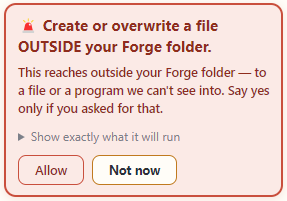
During this build, the app stopped and asked before anything was written. This is what that looks like — a real card, from a real session:

A Forge permission card: 'Create or overwrite a file OUTSIDE your Forge folder. This reaches outside your Forge folder — to a file or a program we can't see into. Say yes only if you asked for that.' with Allow and Not now buttons

Captured from a live session in Nate's own Forge. Every action that reaches outside a machine's folder shows a card like this and waits for a human — “say yes only if you asked for that” is the whole safety posture in one box.

What it built
the capital-flow timeline — per-entity coverage, calls against distributions open full page ↗
How it runs

From five notices sitting in one folder: three calls — $9M due 8/4, $7M due 8/7, $6M due 8/11 — against two distributions, $2.25M and $1.4M, both landing 8/14, after every call is already due. The machine's answer, in its own words: “The answer to 'can we cover next month's calls': no, not from what's currently scheduled. All three entities go short … Kestrel Lane never gets an offset from anything in the folder.” [source: the timeline] [source: transcript]

No “what you throw into it” beat here, on purpose: this machine eats a folder of clean PDF notices. We don't fake a mess where there isn't one.

⭐ What it did that was awesome
  • It asked which entity pays each call — before it built anything. [source: transcript]
  • Told the bank statements live in somebody else's folder, it never goes hunting for a balance. [source: transcript]
  • An overdue call gets louder, never quieter — fading it would hide the exact problem. [source: transcript]
03 The meeting nobody wrote down the ops & EA seat
The problem

The family council met Thursday. The transcript is an hour long, nobody's labeled, and half the room talks over the other half. Somebody has to turn that into minutes fit to circulate — and a list of who committed to what, so things actually get chased.

How you ask

Them:“Our family council met last Thursday and the meeting was recorded. Grace already typed up the raw transcript … I need two things out of it: proper minutes I can circulate, and a plain list of who committed to what and by when, so I can actually chase people. Fair warning, the transcript is a mess — nobody's labeled, people talk over each other … And this will happen after every council meeting, roughly monthly, so I want something I can hand each new transcript to, not a one-time favor.”

Verbatim from the capture — [read the whole conversation]

One thing about that transcript. This office still had Grace type it up by hand, the way they always had. You don't have to. Forge comes with voice transcription built in, so nobody takes meeting notes again: drop the Zoom recording, an audio file, or a rough transcript into any machine's inbox, and it transcribes the raw, messy recording and cleans it up first, then does the job. This run happened to start from a human transcript. It runs exactly the same from the recording alone.
How Forge reacts

It didn't start building. It checked its own shelf first — and it already had a machine for this. That's the selling point, not a shortcut: the office's shelf gets deeper every month, and the agent knows what's on it.

Forge:“Before building anything from scratch I checked the engine's catalog of pre-built machines — and this is almost exactly a match. … One honest limit: it doesn't do speaker-by-speaker diarization — it reads the transcript and works out who said what from context, same as I'd do by hand. … I'll flag anything genuinely ambiguous rather than guess. Want me to install this … and run Thursday's transcript through it now?”

Them:“Yes, set it up and run Thursday's transcript through it. One thing though — like you said, if you can't tell who someone is or what actually got agreed, flag it for me, don't guess. I'd rather fill in a blank than circulate minutes that put words in someone's mouth.”

Verbatim, excerpted — [the whole conversation]

What it built
the July council meeting — decisions, owners, due dates, and what it declined to guess open full page ↗
How it runs

Out of one messy hour: six action items with owners and due dates, two decisions, three follow-up drafts — “Nothing sent — read, edit, send yourself” [source: the meeting page]. A $400,000 request came up in the meeting and was not marked approved — it was routed to the corporate trustee, because in this office distributions are a trustee decision, not a council vote [source: the meeting page]. One comment was explicitly said off the record — it was left out of every document entirely, not just the action list [source: transcript]. And five days later, the machine's follow-up: the urgent forward was due Friday — “the meeting only has her saying she'd do it by then, not confirmation it happened” [source: transcript].

No input-pile beat here either: the input is one transcript file. The mess is inside it, and beat ⑤ is where that shows.

⭐ What it did that was awesome
  • The chair is never named in the recording. It flagged the name instead of guessing it. [source: transcript]
  • A $400,000 request wasn't “approved” — it was routed to the trustee, and the machine knew the difference. [source: the meeting page]
  • It checked the shelf before building — it already had a machine for this job. [source: transcript]

Seven more, one line each.

The point of this list isn't any single row. It's that this is one office's whole paper day, and each row is a machine that already exists in the demonstration. Click any row to open it.

04 K-1 Roll Call K-1s trickle in for months, an amendment quietly buries the original — and one buried schedule carries Massachusetts-sourced income, in a state where the office holds no entity. Built: a roll-call board — expected, arrived, amended, and the states each one drags in. “Copy of K1_2025_FINAL(2).pdf” — recognized as the amendment that supersedes the original. [source: roll-call board]

This machine leads the rows on its input pile: Copy of K1_2025_FINAL(2).pdf, FW_ tax docs.pdf, to file/scan_06302026.pdf — the drawer as it actually arrives.

K-1 roll call — expected · arrived · amended · states open full page ↗
05 The Obligation Calendar Everything the office owes anyone in the next 60 days lives in five different places and two people's heads. Built: one calendar of everything owed in the window — merged from four machines, three role folders, and the office spine. No folder can hold this page — it only exists because something reads the whole office. [source: calendar view]
the obligation calendar — everything owed, one window open full page ↗
06 One Entity, Everything The attorney asks for “everything on Kestrel Lane” and the answer is scattered across six role folders. Built: one page per entity — pulled out of six role folders, the office spine, and four machines, by asking for it. The view was cut by asking a question — not by rebuilding the filing. [source: entity view]
entity dossier — Kestrel Lane LLC, everything on one page open full page ↗
07 Insurance Schedule Dec pages arrive one at a time, and a renewal date nobody tracked is a lapse nobody chose. Built: a schedule from the dec pages it has, with renewal flags and a needs-review list for anything it can't read cleanly. It states its renewal flag's scope exactly — and names its own edge. [source: schedule]

The renewal this machine can't see from its own files is exactly the gap the absence view named at the top of this page. That's not a flaw in the machine; it's the reason the overview exists.

insurance schedule — policies, renewals, needs-review open full page ↗
08 Travel Dossier The trip exists as a pile of confirmation emails, and the one detail that didn't make the folder is the one the driver needed. Built: one day-by-day dossier per trip — times zoned, standing preferences woven in. A confirmations inbox in; one dossier out — the second genuine mess on this page. [source: dossier]
travel dossier — NYC + Connecticut, day by day open full page ↗
09 Collection Register The collection is documented in appraisal PDFs and a spreadsheet last touched in 2019. Built: a register — each piece, its provenance, location, and appraisal, one click deep. Grouped by location, valued by appraisal, checked against the floater's own list. [source: register]
collection register — every piece, one click deep open full page ↗
10 The three empty desks In this demonstration office, the gaps clustered exactly where nobody had a machine — $22,000,000 of August calls, a grounds invoice paid twice, grant letters with no dashboard of their own — all sitting in unwatched folders. Built: nothing yet. That's the point of this row. Your version of this list is different — the install starts by mapping your desks. [source: absence view]

Every gap the overview found lived in a folder no machine was watching. The first working session of an install is finding your unwatched folders. That conversation is the first door at the bottom of this page.

the absence view, again — now you know what you're looking at open full page ↗

The world view

These aren't ten apps. They're one world.

Every wedge ships two machines by law, because together they're the proof: the machines share one set of files, and something reads all of it.

The Organizer: mess in, filed out.

Straight from the drawer, on the run you watched in unit 01:

untitled.pdf
  → 2026-07-21 · investment-committee memo · filed under Correspondence
scan_001.pdf
  → 2026-05-31 · Ashborne custody statement · filed under Statements

And the part that matters more than the filing: it never deletes. When it finds what looks like a duplicate, it parks it where a person decides. The mess gets smaller; nothing gets gone. [source: the sweep plan]

The Overview: what lives between files.

The absence view at the top of this page is this machine. It's built last, it reads everything the other machines keep, and its job is the thing no single folder can hold: the gap that only exists between two files.

Two renewal lists that don't match. A policy renewing in 56 days that no one machine can see. Now that you've walked the reel, you know why it can find those and nothing else in the office can. [source: absence view]

And in this office, the gaps clustered where nobody had a machine. That list is the demonstration selling the next build.

The graveyard

What this deliberately does not do.

Not missing features. Wars I'm deliberately not fighting.

It never touches money.

No wires, no payments, no transfers. It reads about money and writes reports about money. Nothing moves.

No custodian connections.

It reads the statements you already download. No portal logins, no feeds, no sync. It never holds a login to anywhere your assets live.

It doesn't replace your GL.

Your books stay where your accountant likes them. These machines work the paper around the books.

No tax, legal, or investment advice.

It will lay out a capital-call timeline to the day. It will never have an opinion about whether the fund was a good idea.

Nothing runs unattended.

Machines prep, organize, summarize, and flag. Humans verify and sign. You saw the plan wait for a yes in unit 01 — that's the posture everywhere.

No direct integration with your existing software.

Forge will process any data you give it — pointing your exported files into a machine's inbox folder is all it takes, and it runs from there. Wiring that export up is easy, but it's yours to set up: I stay out of the live-integration and security side on purpose, so that part stays in your hands, not mine.

The part your world will ask about first

These are only files on your desk.

A family office is right to be paranoid about software. So here's the honest shape of this: these machines work on files you're already moving around anyway — the statements you already download, the PDFs already in the drawer. Nothing new leaves your building; Forge is just reading what's already there.

And it doesn't demand to be your system of record. Keep storing documents wherever you store them. When paper arrives, organize it through Forge and take the clean output wherever it needs to live. Tell the machines the folder structure you currently keep — or the one you wish you kept — and they rename, sort, and stage into it. From there it's a simple matter of moving files from one gigantic messy pile to clean and organized.

The honest mechanics

What you'd actually own, and what it costs.

What you'd own

Plain files, on your own computers. Every machine is folders and pages you can open, read, and audit — and change by talking to it: “make it work like this instead” is all you have to say to mold it into exactly what you need. What you own is the machines themselves, never “the app.”

For the $10,000 install, that's every machine on this page: built onto your office's home dashboard and shaped to your actual desks, with me in the room. They stay editable by talking, and you build your own any time after I leave.

The install also stands up the shared side of the shop: one pooled tank of gas — the metered AI everyone's machines run on — that the whole company draws from, so no one person gets rationed and you run on a single predictable pool. Plus a shared tools shelf, where the team pushes and pulls the best version of each machine it builds — use one straight from the shelf, or pull it onto your own Forge and make it yours.

What it costs

$10,000  one time, for the install: every machine on this page, built onto your world and shaped to your desks, with me in the room.

$50/mo  per seat after that, for the people who use it — half the standard professional price, for the full professional seat: the commercial-grade version of every tool.

That's the whole cost. No per-document pricing, no tiers invented for this page.

About the office you just toured

Wrenfield is a fiction — invented documents, marked as specimens on every page, built so you could see real machines work without anyone's real papers on the internet. The numbers are fiction; the questions it asked and the gaps it found are not — and every figure links to the page it came from, so the dare stands: check its work. [browse every real document]

Two doors

If this looks like your office, here's what's next.

Talk to Nate about the $10,000 install.

Every machine on this page, pre-installed on your office's home dashboard — then shaped to your actual desks, with me in the room. They stay editable by talking, and you build your own machines any time after I leave.

It also pools the whole company's gas into one shared tank everyone draws from, so no one gets rationed, and stands up a shared tools shelf — the best version of every machine the team builds, in one place to use, or pull down onto your own Forge and make your own.

After the install, seats run $50/month — half the standard professional price, for the full professional seat. What you're paying for is the machines, the install day, and me.

Grab a short meeting with Nate

Or try Forge yourself first.

Download Forge and run it in your own office at $100/month per professional seat, for as many people as you want to test it. Cancel any month; everything you build stays yours, in plain files.

To be straight about it: the trial doesn't come with this page's family-office machines — those come with the install. What you get is Forge itself, to build your own machines and feel how it works. If you like what you see, the $10,000 install brings all these machines onto your world and drops your seats to $50.

Download Forge
Know the person who should see this?

This page forwards well — it was written to need no introduction. Send it as-is to the person in your office who owns the paper.

Copy the link

Not a family office? If your world has its own version of this paper problem, ask for your vertical — these demonstrations are built per field, and yours might be next.