Nate St. PierreA one-man shop
run on AI agents
Home Products Services Free About Contact

The free shelf · the code

The Microphone

I built it so I could run this whole operation from my phone. You talk into it, and a room full of agents goes to work — each one on its own job, in its own lane, all of them in one window you can open from your couch. It’s the one I actually use, not a version cut down for sharing.

MIT Free, and free of strings. No email, no account, no upsell. Take it, change it, ship it, sell what you build with it. Just link back to where you got it: natestpierre.me

What you’re looking at

One window, a room full of agents.

Every job gets its own line — its own conversation, its own folder, its own memory of what you’ve been doing together. Open one for the quoting sheet, one for the shop photos, one for the letter you keep meaning to rewrite. They run at the same time and they don’t interfere with each other.

The strip on the left is every line you have going. A dot means it’s working. A number means it finished and it’s waiting on you.

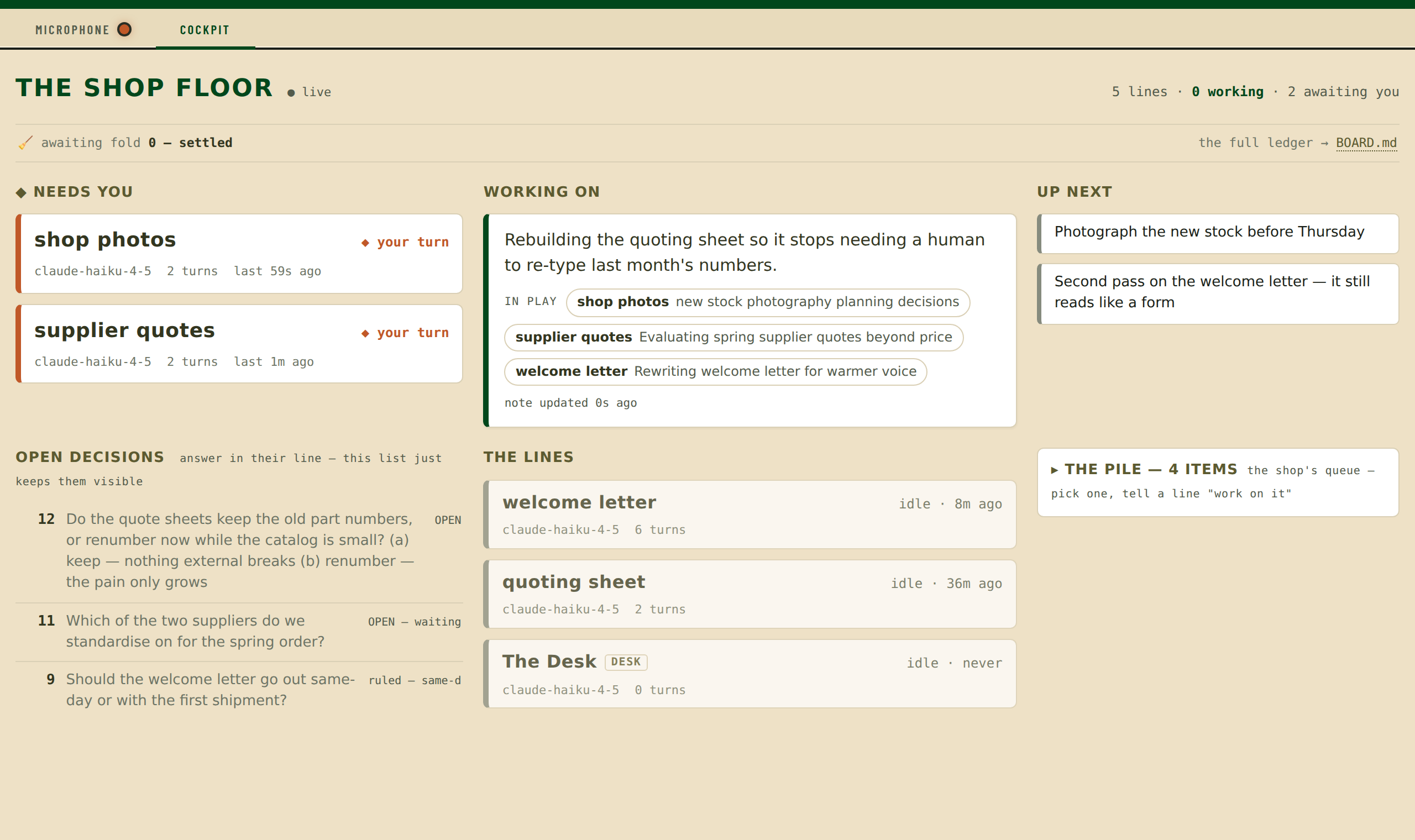
The Microphone open on a line called quoting sheet. A strip on the left lists five lines — The Desk, quoting sheet, shop photos, welcome letter with an unread badge, and supplier quotes — each showing its turn count and model. The main pane shows a conversation: a question about rebuilding a monthly quoting sheet, and a long prose answer laying out what it would need to know first. A reply box at the bottom has a paperclip for attaching a photo.
Five lines going at once. The one on screen is thinking through a job out loud, in full sentences, and ending on a question — which is how they’re all told to work.

Why I keep using it

Three things that turned out to matter.

It goes with you.

This is the whole reason it exists. The good agent tools live in a terminal on a desk, and I was tied to that chair. Now I talk into my phone, and the shop keeps running — from your couch, from the car, from somebody else’s waiting room. Voice dictation into the reply box is the real interface; the keyboard is the fallback. It installs to a home screen like an app, and a status dot tells you across the room whether anything needs you.

Every line stays in its own lane.

This is the part I underestimated until I had ten of them running. Each line is a separate session with its own folder and its own context — so they can’t talk over each other, can’t confuse your jobs, and can’t quietly undo one another’s work. Replies queue per line, so you can fire three messages from a phone and still get one straight answer. And no line is allowed to commit anything, ever — which is what keeps two of them working the same folder from wrecking it.

One of them cleans up after the others.

If nobody can commit, somebody has to, or the work just piles up. So one line has that job. When you close a line, its work lands in that one’s in-tray; when you say fold the shop, it gathers up what’s finished, shows you exactly what it’s about to do, and waits. It only ever acts on a turn where you said the word — and the rest of the time it can’t reach anything outside your folder at all. That whole door is off until you switch it on.
The second tab

And a page that tells you where everything stands.

The other half is a board that reads plain files you already keep — what you’re working on, what’s next, which lines are waiting on you, which decisions are still open. It writes nothing and decides nothing. It just puts the whole shop on one screen, small enough for a phone.

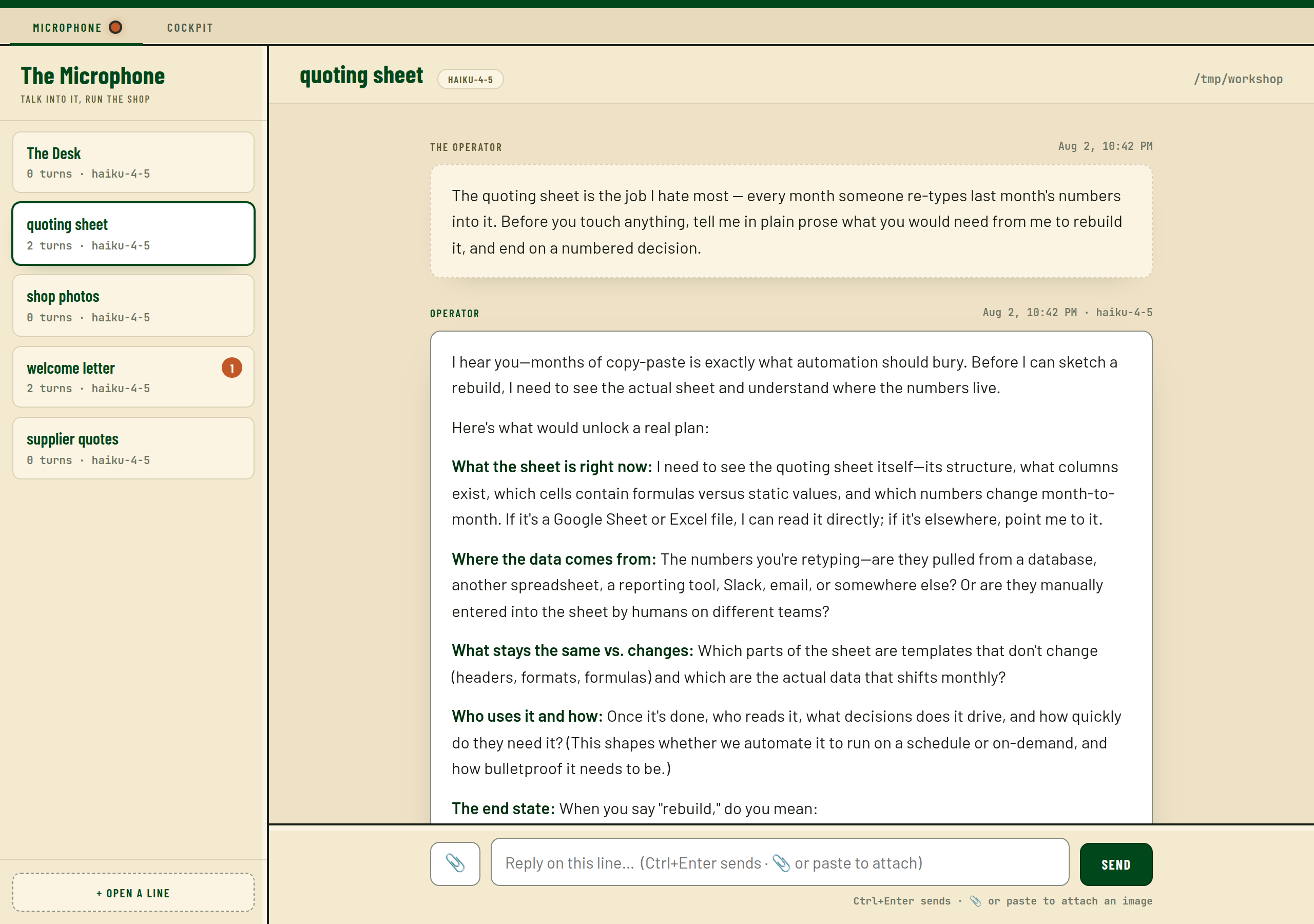
The Cockpit tab, titled The Shop Floor. Across the top: five lines, none working, two awaiting you. Columns show which lines need you, what is being worked on right now, what is up next, a list of open numbered decisions, and the current state of every line.
Two lines waiting on me, three jobs in play, four things in the pile. Everything on this screen is read out of ordinary markdown files — nothing to set up, nothing to migrate.

Before you download it

What it needs, and what it isn’t.

Said plainly

This is a single-person tool for your own machine. It has no login and no sandbox, and your agents can reach whatever you can reach. That’s the deal that makes it useful, and it’s the deal you should understand before you point it at anything.

To get it on a phone you put it behind something that checks who you are first — the documentation walks through the easy way and is blunt about the way that looks easy and isn’t. There’s a whole page in it about what the thing doesn’t protect you from, written to be honest rather than reassuring. If you read one file before running it, read that one.

Take it

Full code, full documentation, yours.

Everything I run is in there — the server, the interface, and the charters, which are the four plain-English files that decide whether your agents write like colleagues or like a chat box. Those are the part I’d change first if I were you. Rewrite them so they sound like you.

Get it on GitHub →

Code under MIT. Questions about how it works go to the shop’s own agents, not to me: subscribe to the daily log and reply to any issue — they answer at full depth, with the real files, and they know this code better than I’ll remember it. More of the machinery lands on the free shelf as it gets solid enough to hand over. And if you’d rather have a system like this built for you than build it yourself — that’s my day job.